ERP isn’t just for big companies anymore. These days, small and mid-sized businesses depend on platforms like SAP Business One to keep things running smoothly, make smarter decisions, and grow faster. But picking the right setup—Cloud or On-Premise—isn’t exactly simple.
You get the same strong ERP features with both options: finance, inventory, CRM, reporting, you name it. The real differences show up when you look at things like performance, costs, how easily you can scale, and how much control you keep over your systems.
A Technical Dilemma
If you’re running a business in Berlin and thinking about SAP B1, your decision shapes how efficient you’ll be, how much you’ll spend on infrastructure, and how easily you can grow down the road. This guide breaks down what separates cloud from on-premise, so you can figure out what fits your company best.
What is SAP Business One: A Modern ERP for SMBs
Before comparing deployment models, it’s important to understand the platform itself.
SAP Business One is an integrated ERP solution designed specifically for small and mid-sized companies. It enables businesses to manage financials, sales, inventory, purchasing, and customer relationships within a single centralized system.
By consolidating business processes into one platform, companies gain:
- Real-time financial visibility
- Data-driven decision-making
- Improved operational efficiency
Today, businesses can deploy SAP Business One in two primary ways:
- SAP Business One Cloud
- SAP Business One On-Premise
Both models run the same ERP software but operate on different infrastructure models.
SAP Business One Cloud: How It Works
In a cloud deployment, the ERP system is hosted in a secure data center or cloud infrastructure such as Microsoft Azure or AWS. Employees access the system through the internet instead of relying on local servers.
This means the hosting provider manages:
As a result, businesses can focus on operations rather than IT management.
Key characteristics of SAP Business One Cloud include:
- Subscription-based pricing
- Remote access from anywhere
- Automatic updates and maintenance
Cloud ERP has become increasingly popular because it eliminates the need for expensive in-house servers while still delivering enterprise-grade capabilities.
SAP Business One On-Premise: The Traditional Approach
With an On-Premise deployment, SAP Business One is installed directly on servers located within the company’s infrastructure.
This model gives organizations complete control over:
- Infrastructure management
However, the company must also manage:
While on-premise deployments offer flexibility and control, they require higher internal resources and infrastructure investment.
Performance Comparison: Cloud vs On-Premise SAP Business One
Performance is one of the most important considerations when selecting an ERP deployment model.
Cloud Performance
Modern cloud infrastructure platforms such as Microsoft Azure offer high-performance computing resources, global data centers, and automated scalability.
Cloud-hosted SAP Business One provides:
- Real-time data processing
- Disaster recovery capabilities
Enterprise cloud environments often guarantee 99.9% uptime and redundant systems to prevent downtime.
Because computing resources can scale automatically, companies can maintain consistent performance even as workloads increase.
On-Premise Performance
On-premise performance depends heavily on the hardware and infrastructure deployed by the company.
Advantages include:
- Dedicated computing resources
- Full optimization of hardware
However, performance improvements require hardware upgrades. This means companies must purchase additional servers, storage, or computing power as the business grows.
Key Takeaway
- Cloud: Dynamic scalability and enterprise-grade reliability
- On-Premise: Stable performance but dependent on internal infrastructure
Cost Comparison: The True Total Cost of Ownership
Cost is often the deciding factor when evaluating ERP deployment.
SAP Business One Cloud Cost Model
Cloud deployments operate on a subscription-based model, typically billed monthly per user.
This pricing structure usually includes:
Typical subscription costs can range between $110 and $219 per user per month, depending on configuration and hosting environment.
Cloud ERP significantly reduces upfront investment because companies avoid purchasing servers, storage, and IT infrastructure.
Cost Advantages of Cloud ERP
- Predictable monthly costs
- Reduced IT staffing requirements
SAP Business One On-Premise Cost Model
On-premise ERP typically follows a perpetual licensing model.
This means businesses must purchase:
Additionally, companies must budget for:
While long-term licensing ownership may appear attractive, the total cost of ownership can increase due to infrastructure and maintenance expenses.
Cost Advantages of On-Premise
- No recurring subscription fees
- Customizable infrastructure
Control and Security: Which Model Provides Better Protection?
Security and control are often the biggest concerns when migrating ERP systems.
On-Premise Security
On-premise deployment gives companies full control over:
This makes it appealing for industries with strict regulatory requirements.
However, security responsibilities fall entirely on the organization.
This includes:
- Disaster recovery planning
Without a dedicated IT team, maintaining enterprise-grade security can be challenging.
Cloud Security
Cloud providers invest heavily in cybersecurity infrastructure.
Modern cloud platforms provide:
- Disaster recovery systems
Enterprise cloud providers also comply with global security standards and maintain redundant data centers to prevent data loss.
For many SMBs, cloud infrastructure actually provides stronger security than locally managed systems because it is managed by specialized experts.
Scalability and Business Growth
Growth is another key factor in choosing the right ERP deployment.
Cloud Scalability
Cloud ERP solutions allow businesses to scale quickly.
Companies can easily:
- Increase storage capacity
- Expand computing resources
- Integrate additional modules
All of this can be done without purchasing new hardware.
This flexibility makes SAP Business One Cloud ideal for fast-growing organizations.
On-Premise Scalability
On-premise scalability requires infrastructure expansion.
Growth may involve:
- Expanding storage capacity
- Reconfiguring network infrastructure
These upgrades require time, investment, and IT planning.
Accessibility and Remote Work
Modern businesses operate across multiple locations, making accessibility a critical factor.
Cloud ERP Accessibility
SAP Business One Cloud enables employees to access the system from:
Users simply need an internet connection.
This flexibility supports remote teams and global collaboration.
On-Premise Accessibility
Accessing on-premise ERP remotely requires additional setup such as:
- Secure network configurations
While possible, remote access is more complex compared to cloud deployment.
Customization and Integration
Customization capabilities also influence ERP deployment decisions.
On-Premise Customization
On-premise SAP Business One offers greater control over:
- Integration with internal systems
Companies can modify system configurations extensively.
Cloud Customization
Cloud ERP systems typically support:
- Standard customization tools
While slightly more standardized, cloud solutions still offer significant flexibility.
Why Many SMBs Are Choosing SAP Business One Cloud
Cloud infrastructure is taking over the business world, and it’s not hard to see why. It’s cheaper to get started, you can set things up quickly, and you don’t have to tackle complicated IT headaches. Need to grow or scale back? Cloud makes that easy too.
Plus, your team can log in and work from anywhere. Switching to cloud-based ERP also opens the door to cool stuff like AI-powered analytics, automation, and better reporting tools. So, it’s not just about saving money—it’s about staying ahead.
Why Partnering with an SAP Expert Matters
Regardless of deployment choice, implementing ERP successfully requires experienced guidance.
A certified partner ensures:
- Correct system architecture
- User training and adoption
This is where Ingold Solutions, a trusted provider for SAP B1 in Berlin, plays a critical role.
Ingold Solutions Becomes Your Trusted SAP Business One Partner in Berlin
Implementing ERP is a strategic investment that affects every department in your company. Choosing the right SAP partner is just as important as selecting the right deployment model.
Ingold Solutions specializes in delivering tailored ERP implementations for growing businesses.
With extensive expertise in SAP Business One Cloud, Ingold Solutions helps organizations:
- Implement scalable ERP solutions
- Migrate from legacy systems
- Optimize business processes
- Integrate ERP with eCommerce platforms
- Maintain secure and efficient cloud environments
For companies seeking SAP B1 in Berlin, Ingold Solutions provides end-to-end services—from consulting and deployment to training and long-term support.
Their approach focuses on delivering ERP solutions that align with your company’s strategy, infrastructure, and growth goals.
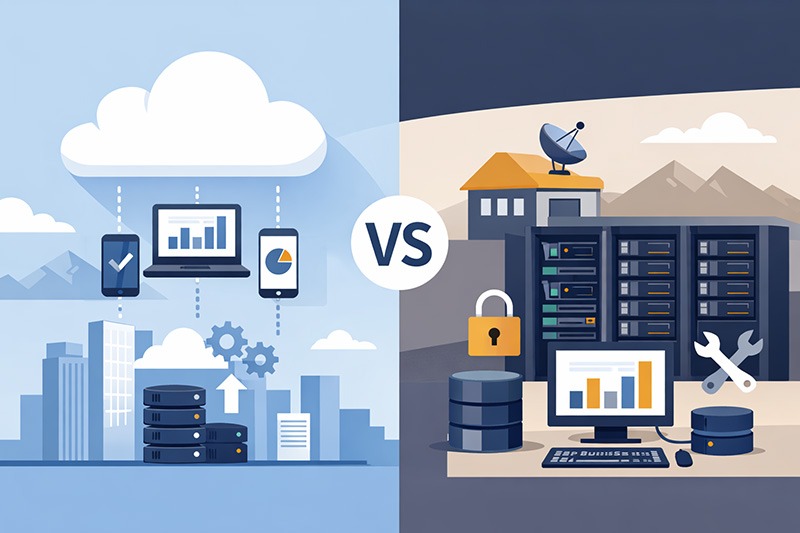
Cloud vs On-Premise SAP Business One – Perfect Comparison
Choosing between SAP Business One Cloud and on-premise deployment ultimately depends on your company’s priorities.
| Factor |
SAP Business One Cloud |
On-Premise SAP Business One |
| Initial Cost |
Low |
High |
| Scalability |
Excellent |
Limited by hardware |
| Maintenance |
Managed by provider |
Internal IT team |
| Remote Access |
Built-in |
Requires additional setup |
| Customization |
Flexible |
Extensive |
| Security Management |
Vendor-managed |
In-house responsibility |
For most SMBs, SAP Business One Cloud offers the best combination of flexibility, cost efficiency, and scalability.
However, businesses with strict compliance requirements or complex customization needs may still prefer on-premise deployment.
Are You Ready to Transform Your Business with SAP B1 in Berlin?
Upgrading your ERP isn’t just about new software—it changes the way your whole business runs. Maybe you’re looking into SAP Business One Cloud, thinking about a migration, or just trying to figure out which ERP setup fits you best.
Either way, the partner you choose makes all the difference. Ingold Solutions stands out in Berlin for helping companies roll out SAP B1 that actually fits their needs—secure, scalable, and built for growth. With smart planning and the right experts on your side, SAP Business One turns into the backbone for better decisions, smoother workflows, and growth that lasts.






 Applicable for Package
 Optional