


SAP Business One Shopify Integration Architecture Explained
"We already have an integration" is one of the more dangerous sentences in an SAP Business One project. It usually means a nightly CSV export somebody built three years ago, held together with a scheduled task and one developer's memory of why it works. It is not an architecture. It is a workaround that has not failed yet.
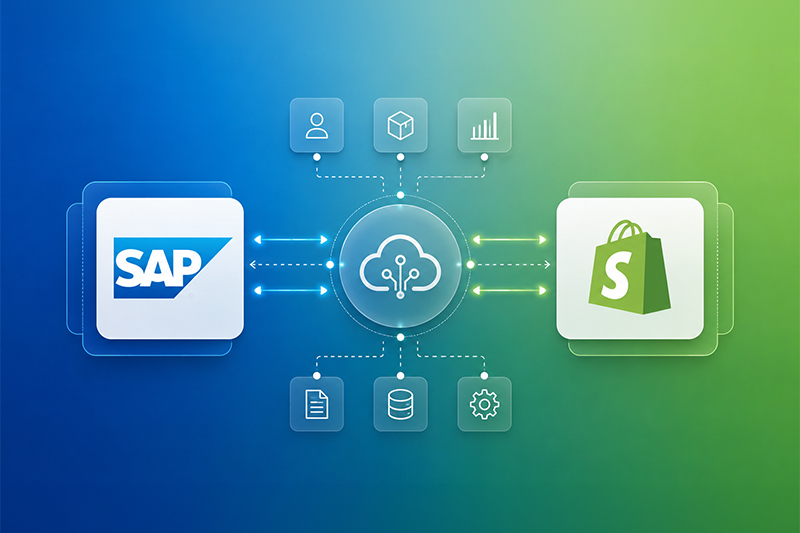
A genuine SAP Business One Shopify integration architecture is a designed system with layers that each do one job: a data access layer that exposes SAP objects safely, an event layer that reacts to change as it happens, an orchestration layer that transforms and routes that data, and an observability layer that tells you when something has gone wrong before a customer does. This article works through each of those layers — Service Layer, REST, GraphQL, webhooks, middleware, direct integration, monitoring and security — and how they fit together into a data flow that actually holds up at order volume.
The two flows run in opposite directions and on different triggers — one largely scheduled or event-driven from the SAP side, the other webhook-driven from the Shopify side — which is precisely why treating the integration as a single undifferentiated pipe, rather than two distinct flows with their own failure modes, is where a lot of home-built integrations run into trouble.
What "Architecture" Actually Means in an SAP B1–Shopify Integration
It is worth being precise about the word, because "integration" gets used to describe everything from a single scheduled script to a fully event-driven, monitored data pipeline. Architecture, in this context, means the deliberate choice of how data gets from SAP Business One to Shopify and back — which protocol carries it, what triggers the transfer, where transformation logic lives, and how failures are caught rather than discovered by an angry customer. Every SAP Business One Shopify integration, regardless of vendor or approach, is built from the same handful of components. SAP Business One exposes its data through the Service Layer (a modern, RESTful, OData-based API) or, in older or deeper-access scenarios, the DI API. Shopify exposes its data through the Admin API, available in both REST and GraphQL form, and pushes real-time events out through webhooks. Sitting between the two is either a thin, direct connection or a middleware layer that handles mapping, transformation and error handling. Around all of it sits monitoring and security, which are not optional add-ons but the difference between an integration that scales and one that quietly corrupts data during a flash sale. Understanding each layer on its own terms — rather than treating "the integration" as a single black box — is what makes it possible to diagnose problems, plan for scale, and choose the right architecture for a given business rather than the one a vendor happens to sell.The SAP Business One Service Layer: The Foundation Layer
The Service Layer is SAP Business One's own application server for external access — an OData-based REST API that speaks HTTP and JSON, sitting on top of the same business object layer the SAP client itself uses. It runs identically whether SAP Business One is deployed on SQL Server or HANA, which matters because it means an integration built against the Service Layer does not need to be rebuilt if the underlying database platform changes. Two details catch most teams building against it for the first time. The first is session handling: authentication is comparatively slow, while subsequent calls using the returned session cookie are fast, so an integration needs to cache and reuse that session rather than authenticating on every request. The second is that sessions expire after a period of inactivity, so any integration needs to catch the resulting authentication error and re-authenticate automatically rather than simply failing. For most SAP Business One Shopify integrations, the Service Layer is the correct starting point. It covers item master, business partner, inventory, sales order and AR document data without custom ABAP-style development, and it is the interface Ingold Solutions' own SAP-certified Shopify Add-on is built against — which is part of why it can stay aligned with SAP's own technical and security standards rather than depending on an unsupported workaround.REST APIs: How the Data Actually Moves
REST is the protocol doing the heavy lifting on both sides of this integration. On the SAP side, the Service Layer's REST endpoints expose business objects such as Items, BusinessPartners, SalesOrders and Deliveries as structured JSON resources that can be queried, created or updated over standard HTTP methods. On the Shopify side, the REST Admin API exposes products, customers, orders and inventory levels in the same pattern. In a typical SAP Business One Shopify integration, REST calls handle both directions of the core data flow: pushing product, pricing and stock data from SAP out to Shopify, and pulling customer and order data from Shopify back into SAP as sales documents. Because each call maps cleanly to a single business object, REST remains the most straightforward protocol to build, debug and document — which is exactly why it underpins most production integrations, including template-based and custom-built ones alike. The trade-off is efficiency at scale. A REST integration that needs several related pieces of data — a product, its variants, and its current stock across multiple warehouses — often has to make several separate calls to assemble a single, complete picture, which is where GraphQL starts to earn its place in architecture.GraphQL: Where Shopify's API Strategy Is Heading
Shopify has been steadily shifting its Admin API surface toward GraphQL, and any SAP Business One Shopify integration architecture built today needs to account for that direction rather than assume REST will remain the primary interface indefinitely. GraphQL lets an integration request exactly the fields it needs, across related objects, in a single call — a product with its variants, prices and inventory levels in one round trip, rather than the multiple REST calls the same request would otherwise require. For high-volume SAP B1 to Shopify product and inventory synchronization, that difference is not cosmetic. Fewer round trips means lower latency, less exposure to rate limiting, and simpler error handling, since a single GraphQL response either contains everything needed or clearly reports what failed. Shopify Functions — which run custom logic directly at checkout, for scenarios like tiered pricing that mirrors SAP's own pricing structures — are also GraphQL-native, which matters for any integration planning to support more advanced, SAP-driven pricing logic on the storefront. In practice, most current SAP Business One Shopify integrations still lean on REST for its simplicity, particularly for order intake, while increasingly routing catalogue and inventory synchronization through GraphQL. An architecture designed with both protocols available, rather than locked into one, ages considerably better as Shopify's own API surface continues to evolve.Webhooks: The Event Layer
Polling an API on a schedule to check "has anything changed?" is the single biggest source of both wasted API calls and stale data in ERP-to-ecommerce integrations. Webhooks solve this by inverting the relationship: instead of the integration asking Shopify for updates, Shopify pushes a payload to a defined endpoint the moment an event happens — an order created, a customer registered, a fulfilment updated. In a well-designed SAP Business One Shopify integration architecture, webhooks are what make near-real-time order sync possible. A new Shopify order fires a webhook, which triggers the integration to immediately create the corresponding SAP Business One sales order, complete with customer, item, pricing, tax and discount data, rather than waiting for a scheduled batch job to notice it. The architectural discipline webhooks demand is idempotency: because webhook delivery is not always guaranteed to happen exactly once, the receiving system needs to recognise and safely ignore a duplicate delivery of the same event, rather than creating the same sales order twice. This is detail generic connectors sometimes get wrong, and one worth specifically asking about when evaluating an integration partner.Middleware: The Orchestration Layer
Middleware sits between SAP Business One and Shopify and does the work neither system does natively: transforming SAP's data model into Shopify's, applying business rules, handling retries, and giving a human somewhere to look when something goes wrong. SAP's own Integration Framework (B1if) is one option, built specifically for SAP-centered integration scenarios; third-party iPaaS platforms are another, offering pre-built connectors and visual data-flow configuration in exchange for less SAP-specific depth. Middleware earns its complexity in multi-system environments — SAP Business One, Shopify and a CRM, a warehouse management system, or multiple sales channels all needing to stay in sync — where transformation and orchestration logic would otherwise be duplicated across several point-to-point connections. For a single, well-defined SAP B1-to-Shopify relationship, a purpose-built add-on that wraps this orchestration logic natively, such as the Ingold Solutions SAP Business One Shopify Add-on, typically delivers the same reliability with considerably less infrastructure to maintain. The architectural question worth asking early is not "do we need middleware" but "where does our transformation logic live, and who maintains it when SAP or Shopify changes their API." That question determines far more about long-term cost of ownership than the initial build price.Direct Integration vs Middleware: Making the Trade-off Deliberately
A direct integration connects SAP Business One's Service Layer straight to Shopify's Admin API, with custom code handling authentication, mapping, error handling and retry logic in between. It offers full control and no additional infrastructure layer, which makes it well suited to businesses with unique pricing rules, multi-warehouse logic or custom fields that a template-based product does not cover — provided there is development capacity to build and, critically, maintain it. The maintenance point deserves more weight than it usually gets in vendor comparisons. A direct integration is not a one-off build; it is a piece of software that needs to keep working every time SAP releases a patch, Shopify updates its API version, or a new edge case appears in production. Middleware and pre-built add-ons absorb much of that ongoing maintenance burden into a supported product rather than leaving it with an internal team. As a rough guide: a native, template-based add-on typically suits businesses with standard B2C order-to-fulfilment flows and no unusual pricing logic. Middleware suits businesses already juggling several connected systems. A custom direct build suits businesses with genuinely unique requirements and the in-house or contracted development capacity to support it for the long term — not just to launch it.Monitoring: Keeping the Integration Observable
An integration without monitoring does not fail loudly — it fails quietly, usually as a slow accumulation of unsynced orders, mismatched stock counts, or duplicate customer records that nobody notices until a customer complaints or month-end reconciliation does not balance. A properly architected SAP Business One Shopify integration needs, at minimum, logging of every transaction attempt with enough detail to diagnose a failure without reproducing it live, alerting when a sync fails rather than a dashboard someone has to remember to check, and a reprocessing mechanism that lets a failed transaction be corrected and resubmitted without manual data re-entry on either side. This is the layer most likely to be underbuilt in a rushed or purely custom integration, and it is precisely the layer that determines whether an issue during a peak sales period is a five-minute fix or a week of manual reconciliation.Security: Authentication, Encryption and Access Control
Every layer discussed so far moves commercially sensitive data — customer records, pricing, order values — between two systems over the internet, which makes security an architectural concern, not a checkbox added at the end. At minimum, a sound architecture uses HTTPS for every connection, OAuth 2.0 for API authentication rather than long-lived static credentials wherever both systems support it, and scoped API access so the integration can only read and write the specific data objects it actually needs. SAP Business One's Service Layer supports OAuth 2.0 and OpenID Connect on current versions, which is worth confirming against the specific SAP Business One patch level in use before assuming it is available. Beyond transport security, access control matters just as much: credentials for the integration should be distinct from any individual user's login, rotated on a defined schedule, and scoped narrowly enough that a compromised integration credential cannot be used to access unrelated parts of either system.Data Flow Diagram: How the Layers Work Together
Put together, a typical SAP Business One Shopify integration architecture moves data through the following path for the two most common flows:Catalogue and inventory (SAP Business One → Shopify)
| SAP Item Master & Stock | → | Service Layer / GraphQL | → | Middleware or Add-on | → | Shopify Admin API | → | Storefront |
Orders and customers (Shopify → SAP Business One)
| Shopify Checkout | → | Webhook Event | → | Middleware or Add-on | → | Service Layer | → | SAP Sales Order & A/R Documents |
Frequently Asked Questions
What is the SAP Business One Service Layer?
The Service Layer is SAP Business One's RESTful, OData-based API for external access. It exposes business objects such as items, business partners, sales orders and inventory over HTTP and JSON, and works identically on both SQL Server and HANA deployments.Should a SAP Business One Shopify integration use REST or GraphQL?
Most current integrations use REST for its simplicity, particularly for order intake, while increasingly routing catalogue and inventory synchronization through GraphQL for efficiency. An architecture that supports both tends to age better as Shopify's API surface evolves.Why are webhooks important in this architecture?
Webhooks let Shopify push order, customer and fulfilment events to the integration the moment they happen, rather than requiring the integration to repeatedly poll for changes. This is what makes near-real-time order sync into SAP Business One possible.Do I need middleware, or can I integrate directly?
Middleware is worth the added complexity in multi-system environments needing shared transformation and orchestration logic. For a single, well-defined SAP B1-to-Shopify connection, a purpose-built add-on often delivers the same reliability with less infrastructure to maintain than either a direct custom build or general-purpose middleware.How is data kept secure in a SAP Business One Shopify integration?
A sound architecture uses HTTPS for every connection, OAuth 2.0 authentication where supported, and scoped API credentials limited to the specific data the integration needs — separate from individual user logins and rotated on a defined schedule.What happens when a sync fails?
In a properly monitored integration, a failed transaction is logged, triggers an alert, and can be reprocessed once the underlying issue is fixed — without manual re-entry of the order, customer or inventory data on either system.Can this architecture support multiple warehouses and sales channels?
Yes. Shopify store locations can be mapped to SAP Business One warehouses for accurate stock allocation, and the same architectural pattern extends to additional sales channels by adding further endpoints into the same middleware or add-on layer.Conclusion
None of these layers — Service Layer, REST, GraphQL, webhooks, middleware, monitoring, security — is optional in a SAP Business One Shopify integration architecture built to last. What varies by business is how much of that architecture is built custom, absorbed into a purpose-built add-on, or handled by general-purpose middleware. What should not vary is whether each layer is deliberately designed rather than assumed. Ingold Solutions builds and supports a SAP-certified SAP Business One Shopify integration for exactly this reason — so that catalogue, inventory, customer and order synchronization runs on an architecture that was designed for it, with the monitoring and security layers already built in, rather than assembled under deadline pressure. Contact our SAP integration experts for a free consultation.






 Applicable for Package
 Optional